Can't configure nginx reverse proxy to transfer.sh #225

Closed
opened 2026-01-19 18:29:29 +00:00 by michael · 4 comments
Owner

Originally created by @HamedSepehr on GitHub.

I have transfer.sh running on my vps using docker on port 8081 and this is how I ran it and it works fine:

docker run -d --publish 8081:8080 -v /etc/transfer/tmp:/tmp --name=transfer-test dutchcoders/transfer.sh:latest --provider local --basedir /tmp/

For webserver I'm using linuxserver/letsencrypt which is based on nginx. I wan to proxy domain.com/transfer to transfer.sh. This is the configuration I'm using:

location /transfer {
client_max_body_size 1M;
proxy_pass http://vps_ip:8081;
proxy_http_version 1.1;
proxy_set_header Upgrade $http_upgrade; # allow websockets
proxy_set_header X-Forwarded-For $remote_addr; # preserve client IP
proxy_set_header Host $host;
proxy_set_header X-Real-IP $remote_addr;
proxy_set_header X-Forwarded-For $proxy_add_x_forwarded_for;
proxy_set_header X-Forwarded-Proto $scheme;
}

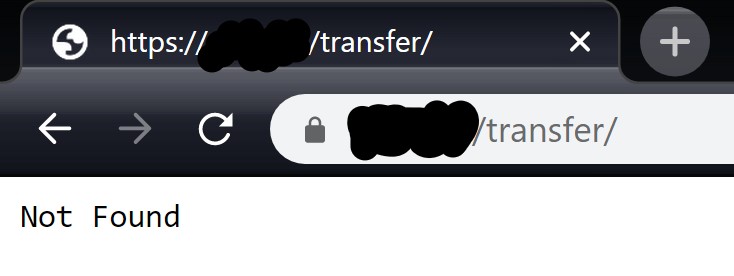
And this is the result:
transfer-sh.jpg

I have no idea what's wrong...

Originally created by @HamedSepehr on GitHub. I have transfer.sh running on my vps using docker on port 8081 and this is how I ran it and it works fine: `docker run -d --publish 8081:8080 -v /etc/transfer/tmp:/tmp --name=transfer-test dutchcoders/transfer.sh:latest --provider local --basedir /tmp/` For webserver I'm using [linuxserver/letsencrypt](https://hub.docker.com/r/linuxserver/letsencrypt) which is based on nginx. I wan to proxy `domain.com/transfer` to transfer.sh. This is the configuration I'm using: > location /transfer { > client_max_body_size 1M; > proxy_pass http://vps_ip:8081; > proxy_http_version 1.1; > proxy_set_header Upgrade $http_upgrade; # allow websockets > proxy_set_header X-Forwarded-For $remote_addr; # preserve client IP > proxy_set_header Host $host; > proxy_set_header X-Real-IP $remote_addr; > proxy_set_header X-Forwarded-For $proxy_add_x_forwarded_for; > proxy_set_header X-Forwarded-Proto $scheme; > } And this is the result: [![transfer-sh.jpg](https://i.postimg.cc/vmTKWSRr/transfer-sh.jpg)](https://postimg.cc/R3rGmdZh) I have no idea what's wrong...
Author
Owner

@crabvk commented on GitHub:

--listener's value has a colon before port number. I spent half an hour trying to figure out what's wrong, because transfer.sh doesn't show any error in case you forgot a colon😟

@crabvk commented on GitHub: `--listener`'s value has a colon before port number. I spent half an hour trying to figure out what's wrong, because transfer.sh doesn't show any error in case you forgot a colon😟
Author
Owner

@HamedSepehr commented on GitHub:

Try to add trailing slashes, one for location location /transfer/, another for proxy_pass proxy_pass http://vps_ip:8081/;
Also remove Upgrade header.
Or you could use transfersh --proxy-path transfer (path prefix when service is run behind a proxy).

I did all of them and now it works without any problem, thanks.

@HamedSepehr commented on GitHub: > Try to add trailing slashes, one for location `location /transfer/`, another for proxy_pass `proxy_pass http://vps_ip:8081/;` > Also remove `Upgrade` header. > Or you could use `transfersh --proxy-path transfer` (path prefix when service is run behind a proxy). I did all of them and now it works without any problem, thanks.
Author
Owner

@crabvk commented on GitHub:

Try to add trailing slashes, one for location location /transfer/, another for proxy_pass proxy_pass http://vps_ip:8081/;
Also remove Upgrade header.
Or you could use transfersh --proxy-path transfer (path prefix when service is run behind a proxy).

@crabvk commented on GitHub: Try to add trailing slashes, one for location `location /transfer/`, another for proxy_pass `proxy_pass http://vps_ip:8081/;` Also remove `Upgrade` header. Or you could use `transfersh --proxy-path transfer` (path prefix when service is run behind a proxy).
Author
Owner

@paolafrancesca commented on GitHub:

thanks @vyachkonovalov for the support

@paolafrancesca commented on GitHub: thanks @vyachkonovalov for the support
Sign in to join this conversation.
1 Participants
Notifications
Due Date
No due date set.
Dependencies

No dependencies set.

Reference: dutchcoders/transfer.sh#225