microsoftofficebusinesspro hangs if installed after microsoftedge #474

Closed
opened 2026-01-19 18:34:10 +00:00 by michael · 9 comments
Owner

Originally created by @erefneb on GitHub.

microsoftofficebusinesspro hangs if installed after microsoftedge

Steps to reproduce:

  1. Run - Installomator.sh microsoftedge
  2. Do not open Edge or Microsoft Auto Update
  3. Run - Installomator.sh microsoftofficebusinesspro

microsoftofficebusinesspro hangs at...
sh-3.2# Installomator.sh microsoftofficebusinesspro LOGGING=DEBUG
2022-09-20 05:28:01 : WARN : microsoftofficebusinesspro : setting variable from argument LOGGING=DEBUG
2022-09-20 05:28:01 : REQ : microsoftofficebusinesspro : ################## Start Installomator v. 9.2, date 2022-05-16
2022-09-20 05:28:01 : INFO : microsoftofficebusinesspro : ################## Version: 9.2
2022-09-20 05:28:01 : INFO : microsoftofficebusinesspro : ################## Date: 2022-05-16
2022-09-20 05:28:01 : INFO : microsoftofficebusinesspro : ################## microsoftofficebusinesspro
2022-09-20 05:28:02 : INFO : microsoftofficebusinesspro : Running msupdate --list
Checking for updates...
Daemon is busy...
Daemon is busy...
Daemon is busy...
etc...

When run from the Terminal app it gives a TCC prompt.
"Terminal" wants access to
control "Microsoft AutoUpdate".
Allowing control will provide
access to documents and data in
"Microsoft AutoUpdate", and to
perform actions within that app.

From the log, "Running msupdate --list" is running "/Library/Application Support/Microsoft/MAU2.0/Microsoft AutoUpdate.app/Contents/MacOS/msupdate" --list

For some reason when microsoftofficebusinesspro is running msupdate --list it hangs.

Originally created by @erefneb on GitHub. microsoftofficebusinesspro hangs if installed after microsoftedge Steps to reproduce: 1. Run - Installomator.sh microsoftedge 2. Do not open Edge or Microsoft Auto Update 3. Run - Installomator.sh microsoftofficebusinesspro microsoftofficebusinesspro hangs at... sh-3.2# Installomator.sh microsoftofficebusinesspro LOGGING=DEBUG 2022-09-20 05:28:01 : WARN : microsoftofficebusinesspro : setting variable from argument LOGGING=DEBUG 2022-09-20 05:28:01 : REQ : microsoftofficebusinesspro : ################## Start Installomator v. 9.2, date 2022-05-16 2022-09-20 05:28:01 : INFO : microsoftofficebusinesspro : ################## Version: 9.2 2022-09-20 05:28:01 : INFO : microsoftofficebusinesspro : ################## Date: 2022-05-16 2022-09-20 05:28:01 : INFO : microsoftofficebusinesspro : ################## microsoftofficebusinesspro 2022-09-20 05:28:02 : INFO : microsoftofficebusinesspro : Running msupdate --list Checking for updates... Daemon is busy... Daemon is busy... Daemon is busy... etc... When run from the Terminal app it gives a TCC prompt. "Terminal" wants access to control "Microsoft AutoUpdate". Allowing control will provide access to documents and data in "Microsoft AutoUpdate", and to perform actions within that app. From the log, "Running msupdate --list" is running "/Library/Application Support/Microsoft/MAU2.0/Microsoft AutoUpdate.app/Contents/MacOS/msupdate" --list For some reason when microsoftofficebusinesspro is running msupdate --list it hangs.
michael added the questionwaiting for response labels 2026-01-19 18:34:10 +00:00
Author
Owner

@erefneb commented on GitHub:

Microsoft Edge is installing MAU 4.30 (On 09/28/2022)
All other Microsoft apps seem to install MAU 4.51 (On 09/28/2022)
So when Installomator runs "msupdate --list" prior to downloading microsoftofficebusinesspro it seems to need to update MAU, and gets into a loop.
Until Microsoft includes a newer version of MAU in the Edge pkg, be sure to install Edge AFTER other Microsoft apps. Or install MAU before anything else.

@erefneb commented on GitHub: Microsoft Edge is installing MAU 4.30 (On 09/28/2022) All other Microsoft apps seem to install MAU 4.51 (On 09/28/2022) So when Installomator runs "msupdate --list" prior to downloading microsoftofficebusinesspro it seems to need to update MAU, and gets into a loop. Until Microsoft includes a newer version of MAU in the Edge pkg, be sure to install Edge AFTER other Microsoft apps. Or install MAU before anything else.
Author
Owner

@erefneb commented on GitHub:

More info...
When you run Installomator.sh microsoftedge
And then right away run /Library/Application\ Support/Microsoft/MAU2.0/Microsoft\ AutoUpdate.app/Contents/MacOS/msupdate --list, you get
Checking for updates...
Daemon is busy...
Daemon is busy...

@erefneb commented on GitHub: More info... When you run Installomator.sh microsoftedge And then right away run /Library/Application\ Support/Microsoft/MAU2.0/Microsoft\ AutoUpdate.app/Contents/MacOS/msupdate --list, you get Checking for updates... Daemon is busy... Daemon is busy...
Author
Owner

@scriptingosx commented on GitHub:

I would recommend adding INSTALL=force to the business pro installomator run to bypass the update tool

@scriptingosx commented on GitHub: I would recommend adding `INSTALL=force` to the business pro installomator run to bypass the update tool
Author
Owner

@scriptingosx commented on GitHub:

@PezzaD84 or you could add INSTALL=force to make Installomator not use the updater...

@scriptingosx commented on GitHub: @PezzaD84 or you could add `INSTALL=force` to make Installomator not use the updater...
Author
Owner

@PezzaD84 commented on GitHub:

I have found an issue with this as well. If a microsoft app is installed then installomator tries to use autoupdate to update the app but it just hangs.
I have been hashing out the IF statement in the microsoft apps I use:
if [[ -x "/Library/Application Support/Microsoft/MAU2.0/Microsoft AutoUpdate.app/Contents/MacOS/msupdate" && $INSTALL != "force" && $DEBUG -eq 0 ]]; then printlog "Running msupdate --list" "/Library/Application Support/Microsoft/MAU2.0/Microsoft AutoUpdate.app/Contents/MacOS/msupdate" --list fi
for example for Microsoft edge I hashed out lines 4015-4018 and it started working fine.

@PezzaD84 commented on GitHub: I have found an issue with this as well. If a microsoft app is installed then installomator tries to use autoupdate to update the app but it just hangs. I have been hashing out the IF statement in the microsoft apps I use: ` if [[ -x "/Library/Application Support/Microsoft/MAU2.0/Microsoft AutoUpdate.app/Contents/MacOS/msupdate" && $INSTALL != "force" && $DEBUG -eq 0 ]]; then printlog "Running msupdate --list" "/Library/Application Support/Microsoft/MAU2.0/Microsoft AutoUpdate.app/Contents/MacOS/msupdate" --list fi` for example for Microsoft edge I hashed out lines 4015-4018 and it started working fine.
Author
Owner

@scriptingosx commented on GitHub:

add INSTALL=force as an extra argument to the script in the policy

@scriptingosx commented on GitHub: add `INSTALL=force` as an extra argument to the script in the policy
Author
Owner

@PezzaD84 commented on GitHub:

Where do you specify that in a jamf policy?

@PezzaD84 commented on GitHub: Where do you specify that in a jamf policy?
Author
Owner

@scriptingosx commented on GitHub:

Like this:
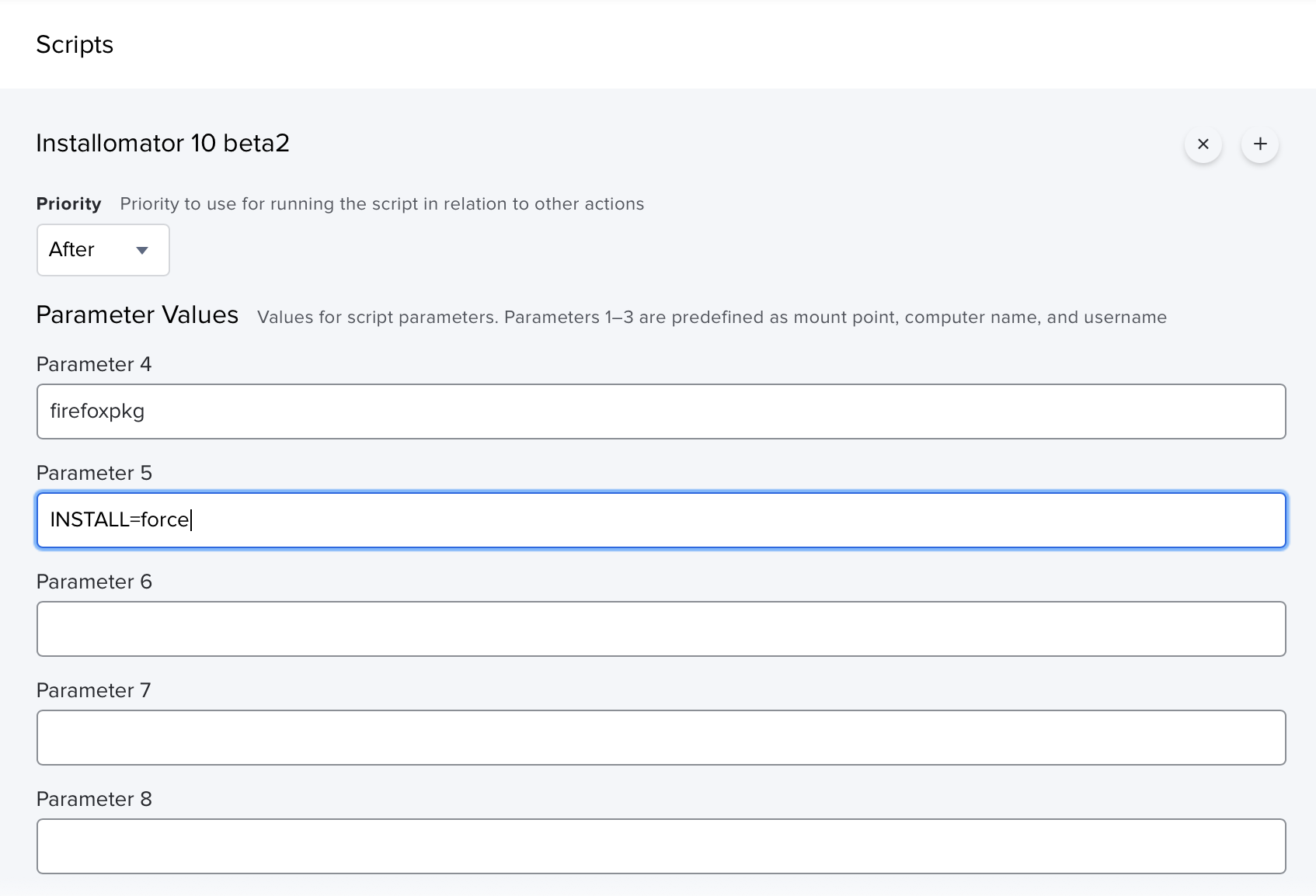
image

@scriptingosx commented on GitHub: Like this: <img width="847" alt="image" src="https://user-images.githubusercontent.com/1933192/204731999-d6edb717-a904-4eed-8415-ecf6f04ea23f.png">
Author
Owner

@PezzaD84 commented on GitHub:

Awesome thanks for the help!

@PezzaD84 commented on GitHub: Awesome thanks for the help!
Sign in to join this conversation.
1 Participants
Notifications
Due Date
No due date set.
Dependencies

No dependencies set.

Reference: Installomator/Installomator#474